Preserve settings and customizations when updating Bootstrap

Recently i launched the Bootstrap CLI tool. This tool installs Bootstrap 4 and an example template to start your project.

The templates for the Bootstrap CLI tool install Bootstrap 4 with bower, which means that you can update Bootstrap by simply running bower update. Updating Bootstrap shouldn’t destroy your changes.

All of Bootstrap’s Sass variable are declared with the !default flag, in the _variables.scss partial file. Using a copy of this file will be help to preserve your changes. Disadvantage of the preceding solution is that new variables added in the new release become undeclared and should be added by hand.

You can prevent the undeclared variables by loading the original and updated _variables.scss from your bower directory after your local one. You should rename your local file.

In your app.scss the preceding should look like that shown beneath:

@import "util/variables"; // non bootstrap project variables
@import "bootstrap-variables"; //local copy
@import "bootstrap.scss"; //local copy
// import or write your custom code here

When new variables are added in the new release they will be set to their defualt value and new default values will overwritten by the local copy. In the case you want to change a new variable, you still have to add it by hand in your local copy. Also new modules and components should be added by hand in the local bootstrap.scss file.

The local _bootstrap-variables.scss and _bootstrap.scss are not automatically generated when creating a new project because of updates of Bootstrap may break the template code.

Bootstrap 4 and WordPress

As already mentioned in my previous post about Bootstrap 4; i have built a WordPress Starter Theme with Bootstrap 4. If you like both Bootstrap and WordPress you should really try it!

People claim that Bootstrap and WordPress don’t always match, some opinions about that can be found at When to Use Bootstrap for Your WordPress Theme (And When Not To) and Why Bootstrap is a bad fit for WordPress Themes.

The problem, Bootstrap is not pure semantic and uses predefined presentational CSS classes for layout and other markup, WordPress uses more semantical code by default, but also has its own CSS classes presentation. So Bootstrap CSS classes do not fit WordPress’ HTML code by default. Two way to fix the preceding; change the HTML output of WordPress or applies Bootstrap’s (S)CSS on the default WordPress classes. Also notice that the SCSS code of Bootstrap, Less code for earlier version had been refactored to avoid both extends and child selectors, which means the way you can use this classes become more flexible.

When changing the HTML output of WordPress, people speak about the “nav walker” thing, indeed you have to create a custom nav walker which enables you to display the Bootstrap CSS classes in the HTML code of your page navigation structures. You can download these walkers anywhere. In the JBST theme the following nav walker classes had been used:

<?php 
// Big thanks to Brett Mason (https://github.com/brettsmason) for the awesome walker
class Topbar_Menu_Walker extends Walker_Nav_Menu {

    // add main/sub classes to li's and links(&$output, $item, 
    function start_el( &$output, $item, $depth = 0, $args = array(), $id = 0) {
   
  
    // passed classes
    $classes = empty( $item->classes ) ? array() : (array) $item->classes;
    $class_names = esc_attr( implode( ' ', apply_filters( 'nav_menu_css_class', array_filter( $classes ), $item ) ) );
    
    $active = in_array('current-menu-item', $item->classes);
    $indent = ' ';
    // build html
    $output .= $indent . '<li class="nav-item">';
  
    // link attributes
    $attributes  = ! empty( $item->attr_title ) ? ' title="'  . esc_attr( $item->attr_title ) .'"' : '';
    $attributes .= ! empty( $item->target )     ? ' target="' . esc_attr( $item->target     ) .'"' : '';
    $attributes .= ! empty( $item->xfn )        ? ' rel="'    . esc_attr( $item->xfn        ) .'"' : '';
    $attributes .= ! empty( $item->url )        ? ' href="'   . esc_attr( $item->url        ) .'"' : '';
    if(in_array('current-menu-item', $item->classes)) {
      $attributes .= ' class="nav-link active"';
        $item_output = sprintf( '%1$s<a%2$s>%3$s%4$s%5$s  <span class="sr-only">(current)</span></a>%6$s',
        $args->before,
        $attributes,
        $args->link_before,
        apply_filters( 'the_title', $item->title, $item->ID ),
        $args->link_after,
        $args->after
        );
    }
    else {
      $attributes .= ' class="nav-link"';
      $item_output = sprintf( '%1$s<a%2$s>%3$s%4$s%5$s</a>%6$s',
        $args->before,
        $attributes,
        $args->link_before,
        apply_filters( 'the_title', $item->title, $item->ID ),
        $args->link_after,
        $args->after
        );
    }      

  
    // build html
    $output .= apply_filters( 'walker_nav_menu_start_el', $item_output, $item, $depth, $args );
    }
}
</pre>

As you can see creating “nav walkers” is not that difficult.

In stead of changing the HTML you can also try to change the compiled CSS code. You can take the page pagination as an example. Currently the JBST theme has got a custom function to display the page navigation which result in the HTML like that shown in the code beneath:

<nav style="text-align:center">
  <ul class="pagination">
    <li class="page-item"><a href="http://wordpress/index.php/page/2/" >Previous</a></li>
    <li class="page-item"><a class="page-link" href="http://wordpress/">1</a></li>
    <li class="page-item"><a class="page-link" href="http://wordpress/index.php/page/2/">2</a></li>
    <li class="page-item active"><span class="page-link"> 3 </span></li>
    <li class="page-item"><a class="page-link" href="http://wordpress/index.php/page/4/">4</a></li>
    <li class="page-item"><a href="http://wordpress/index.php/page/4/" >Next</a></li>
  </ul>                   
</nav>        					

The above HTML code for the page navigation contains Bootstrap CSS classes for presentation.

When using WordPress’ built-in function for page navigation as follows:

<?php
the_posts_pagination( array(
    'mid_size'  => 2,
    'prev_text' => __( 'Previous', 'textdomain' ),
    'next_text' => __( 'Next', 'textdomain' ),
) );
?>   

The function call above will generate HTML code like that shown beneath:

<nav class="navigation pagination" role="navigation">
  <h2 class="screen-reader-text">Posts navigation</h2>
  <div class="nav-links"><a class="prev page-numbers" href="http://wordpress/index.php/page/2/">Previous</a>
  <div class="nav-links">
    <a class="prev page-numbers" href="http://wordpress/index.php/page/2/">Back</a>
    <a class="page-numbers" href="http://wordpress/">1</a>
    <a class="page-numbers" href="http://wordpress/index.php/page/2/">2</a>
    <span class="page-numbers current">3</span>
    <a class="page-numbers" href="http://wordpress/index.php/page/4/">4</a>
    <a class="next page-numbers" href="http://wordpress/index.php/page/4/">Onward</a>
  </div>
</nav>  

Now you can code some CSS code which applies Bootstrap’s presentation for the page navigation on the CSS classes above. You SCSS should look like that shown beneath:

// pagination default
.navigation.pagination {
  @include center-block;
  text-align: center; 
  .nav-links {
    @extend .pagination;
    .page-numbers {
      @extend .page-link;
      &:first-child {
        margin-left: 0;
        @include border-left-radius($border-radius);
      }
      &:last-child {
        @include border-right-radius($border-radius);
      }
      &.current {
        @include plain-hover-focus {
          z-index: 2;
          color: $pagination-active-color;
          cursor: default;
          background-color: $pagination-active-bg;
          border-color: $pagination-active-border;
        }
      }
    }
  }
}

As you can see the above SCSS code looks complex and requires deep knowledge of Bootstrap’s SCSS code. Complexity of the SCSS code partially due to the SCSS code requires the .page-links wrapped into .page-item. Refactoring of the pagination component may reduce the complexity of the SCSS code in future, see also Refactor pagination in accordance with the Navs.

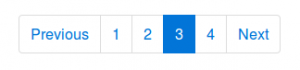
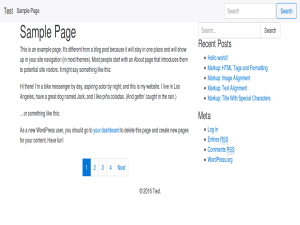
After compiling the SCSS code your page navigation will look like that shown in the figure below:

navigation

Both solutions; HTML or CSS change will give you the same result. When using the Sass @extend directive the compiled CSS code will become a little larger, due to having both the original and the extended selector. On the other hand there is no need to change WordPress by adding custom “walkers” and functions. At the moment i’m not sure which way to choose for the JBST 4 theme, i think most people will expect the HTML of the theme contains Bootstrap’s CSS classes.

Implementing Bootstrap with only SCSS / CSS on a bare theme like HTML5 Blank or _s, or underscores seems interesting too. Possible i will create some like “JBST 4 HTML5” theme in future.
Pure semantic HTML5 seems not possible with the Bootstrap Grid’s now, cause the .container wrapper is still required even when the optional flexbox support has been enabled. But you can compile Bootstrap without the predefined CSS grid classes and use the grid mixins to build your responsive layouts.

Also read What’s New in Bootstrap 4, and Happy coding!

Bootstrap 4 meets WordPress

Bootstrap 4 is coming soon! I build a WordPress theme for Bootstrap 4 (alpha release) inspired on the JOINTSWP starters theme. Bootstrap 4 comes with many improvements and new features. Bootstrap 4 is compiled with Sass instead of Less now.

You can download the JBST 4 theme at: https://github.com/bassjobsen/jbst-4-sass/archive/master.zip.

Now you can use Gulp and Sass to build your own custom version:

Install node.js.
Install bower.
Using the command line, navigate to your theme directory
Run npm install
Run gulp to confirm everything is working

Updating Bootstrap for your theme is simple as running bower update in your theme directory now.

Read more about Bootstrap 4 at The Official Bootstrap Blog or read the v4 alpha docs!

Don’t like Sass? Download a CSS only version of the JBST 4 theme at CSS only version

Bootstrap 4 ships with optional flexbox-based grid system and components, download a CSS only with flexbox support of the theme at CSS only version with flexbox support. To compile your own version of the theme with flexbox support you should edit the assets/scss/_variables.scss file and set $enable-flexbox: true;. Run gulp after your changes.Bootstrap 4, JBST 4 preview

How to install a Start Bootstrap theme on Ruby on Rails 4 using Sass?

I want to install a theme called Grayscale of Start Bootstrap and I don’t know how to do it.

Install a new Ruby on Rails by running >> rails new grayscale. Navigate to your project folder >> cd grayscale then run the following commands:

Sass / SCSS

>> git clone https://github.com/blackfyre/https://github.com/blackfyre/grayscale-sass.git.git
>> cd grayscale-sass
>> bower install
>> cd ..
>> mv app/assets/stylesheets/application.css app/assets/stylesheets/application.scss

Then edit app/assets/stylesheets/application.scss. This file should contain only the following line of code:

@import '../../../grayscale-sass/assets/sass/main.scss';

Javascipt

Edit app/assets/javascripts/application.js. This file should contain the code like that shown below:

//= require jquery
//= require jquery_ujs
//= require turbolinks
//= require_tree .


//= require grayscale-sass/assets/bower_components/jquery.easing/js/jquery.easing.js
//= require grayscale-sass/assets/bower_components/bootstrap/dist/js/bootstrap.js
//= require grayscale-sass/assets/js/grayscale.js

Views

Create a controller called “welcome” with an action called “index”, by running the following command:

>> bin/rails generate controller welcome index

The app/views/welcome/index.html.erb and app/views/layouts/application.html.erb should be edit according grayscale-sass/index.httml

index.html.erb

  <!-- Navigation -->
 <nav class="navbar navbar-custom navbar-fixed-top" role="navigation">
 <div class="container">
 <div class="navbar-header">
 <button type="button" class="navbar-toggle" data-toggle="collapse" data-target=".navbar-main-collapse">
 <i class="fa fa-bars"></i>
 </button>
 <a class="navbar-brand page-scroll" href="#page-top">
 <i class="fa fa-play-circle"></i> <span class="light">Start</span> Bootstrap
 </a>
 </div>

 <!-- Collect the nav links, forms, and other content for toggling -->
 <div class="collapse navbar-collapse navbar-right navbar-main-collapse">
 <ul class="nav navbar-nav">
 <!-- Hidden li included to remove active class from about link when scrolled up past about section -->
 <li class="hidden">
 <a href="#page-top"></a>
 </li>
 <li>
 <a class="page-scroll" href="#about">About</a>
 </li>
 <li>
 <a class="page-scroll" href="#contact">Contact Start Bootstrap</a>
 </li>
 <li>
 <a class="page-scroll" href="#download2">Download SASS</a>
 </li>
 <li>
 <a class="page-scroll" href="#contact2">Contact Blackfyre</a>
 </li>
 </ul>
 </div>
 <!-- /.navbar-collapse -->
 </div>
 <!-- /.container -->
 </nav>

 <!-- Intro Header -->
 <header class="intro">
 <div class="intro-body">
 <div class="container">
 <div class="row">
 <div class="col-md-8 col-md-offset-2">
 <h1 class="brand-heading">Grayscale</h1>
 <p class="intro-text">A free, responsive, one page Bootstrap theme.<br>Created originally by Start Bootstrap.</p>
 <a href="#about" class="btn btn-circle page-scroll pulse">
 <i class="fa fa-angle-double-down"></i>
 </a>
 </div>
 </div>
 </div>
 </div>
 </header>

 <!-- About Section -->
 <section id="about" class="container content-section text-center">
 <div class="row">
 <div class="col-lg-8 col-lg-offset-2">
 <h2>About Grayscale</h2>
 <p>Grayscale is a free Bootstrap 3 theme created by Start Bootstrap. It can be yours right now, simply download the template on <a href="http://startbootstrap.com/template-overviews/grayscale/">the preview page</a>. The theme is open source, and you can use it for any purpose, personal or commercial.</p>
 <p>This theme features stock photos by <a href="http://gratisography.com/">Gratisography</a> along with a custom Google Maps skin courtesy of <a href="http://snazzymaps.com/">Snazzy Maps</a>.</p>
 <p>This version of Grayscale includes full HTML, CSS, and custom JavaScript files along with SASS files and bower for an even easier customization.</p>
 </div>
 </div>
 </section>

 <!-- Contact Section -->
 <section id="contact" class="container content-section text-center">
 <div class="row">
 <div class="col-lg-8 col-lg-offset-2">
 <h2>Contact Start Bootstrap</h2>
 <p>Feel free to email us to provide some feedback on our templates, give us suggestions for new templates and themes, or to just say hello!</p>
 <p><a href="mailto:feedback@startbootstrap.com">feedback@startbootstrap.com</a>
 </p>
 <ul class="list-inline banner-social-buttons">
 <li>
 <a href="https://twitter.com/SBootstrap" class="btn btn-default btn-lg"><i class="fa fa-twitter fa-fw"></i> <span class="network-name">Twitter</span></a>
 </li>
 <li>
 <a href="https://github.com/IronSummitMedia/startbootstrap" class="btn btn-default btn-lg"><i class="fa fa-github fa-fw"></i> <span class="network-name">Github</span></a>
 </li>
 <li>
 <a href="https://plus.google.com/+Startbootstrap/posts" class="btn btn-default btn-lg"><i class="fa fa-google-plus fa-fw"></i> <span class="network-name">Google+</span></a>
 </li>
 </ul>
 </div>
 </div>
 </section>

 <!-- Download SASS Section -->
 <section id="download2" class="content-section text-center">
 <div class="download-section">
 <div class="container">
 <div class="col-lg-8 col-lg-offset-2">
 <h2>Download Grayscale</h2>
 <p>You can download the SASS version of Grayscale for free on the GITHUB page.</p>
 <a href="https://github.com/blackfyre/grayscale-sass/" class="btn btn-default btn-lg">Visit the Download Page</a>
 </div>
 </div>
 </div>
 </section>

 <!-- Contact Section -->
 <section id="contact2" class="container content-section text-center">
 <div class="row">
 <div class="col-lg-8 col-lg-offset-2">
 <h2>Contact Blackfyre</h2>
 <p>If you have problems with the <b>SASS version</b> of the original template, please report it at the</p>
 <p><a href="https://github.com/blackfyre/grayscale-sass/issues">GITHUB Issues page</a>
 </p>
 <ul class="list-inline banner-social-buttons">
 <li>
 <a href="https://twitter.com/gnick666" class="btn btn-default btn-lg"><i class="fa fa-twitter fa-fw"></i> <span class="network-name">Twitter</span></a>
 </li>
 <li>
 <a href="https://github.com/blackfyre" class="btn btn-default btn-lg"><i class="fa fa-github fa-fw"></i> <span class="network-name">Github</span></a>
 </li>
 </ul>
 </div>
 </div>
 </section>


 <!-- Map Section -->
 <div id="map"></div>

 <!-- Footer -->
 <footer>
 <div class="container text-center">
 <p>Copyright &copy; Your Website 2014</p>
 </div>
 </footer>

 <!-- Google Maps API Key - Use your own API key to enable the map feature. More information on the Google Maps API can be found at https://developers.google.com/maps/ -->
 <script type="text/javascript" src="https://maps.googleapis.com/maps/api/js?key=AIzaSyCRngKslUGJTlibkQ3FkfTxj3Xss1UlZDA&sensor=false"></script>


application.html.erb

<!DOCTYPE html>
<html>
<head>
 <title>Grayscale</title>
 <%= stylesheet_link_tag 'application', media: 'all', 'data-turbolinks-track' => true %>
 <%= csrf_meta_tags %>
</head>
<body id="page-top" data-spy="scroll" data-target=".navbar-fixed-top">

<%= yield %>
<%= javascript_include_tag 'application' %>
</body>
</html>

Fonts

>> cp -r grayscale-sass/fonts public

Images

>> cp -r grayscale-sass/assets/images public

Test

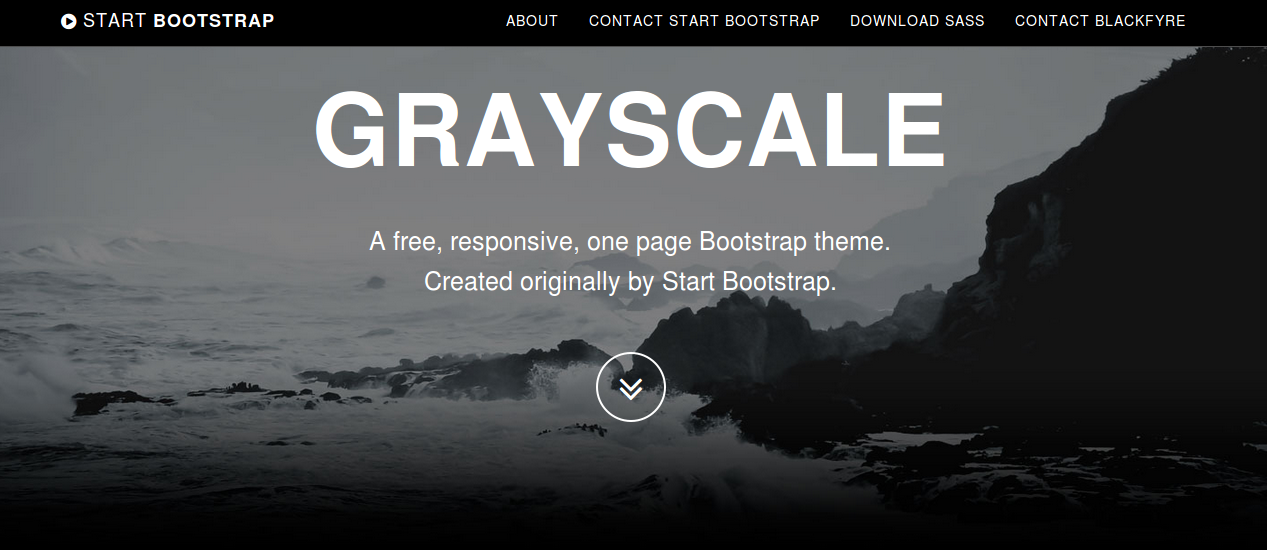
Now you can run >> bin/rails server and open http://localhost:3000/welcome/index in your browser. The result now should look like that shown in the figure beneath: grayscale

Why does Bootstrap have nav and nav-stacked as different classes?

The “Why does Bootstrap have nav and nav-stacked as different classes?” was original posted on stackoverflow. You could ask the same for the .btn and .btn-* classes or the .navbar classes and many other classes in Bootstrap’s Less code.

In short: CSS size (there’re hundreds of such specific-class/base-class tiers so if each .btn-sm would inherit its .btn stuff even via extend, the size of the resulting CSS increases dramatically. Now counting that there was no extend when Bootstrap started, so each sub-class would have to copy the properties, the resulting CSS size becomes just unexpectedly enormous (literally tens-to-hundreds times larger then it is now)). Other reasons may exist as well. – seven-phases-max

I think @seven-phases-max is right in the above comment.

When you extend the same class many time the selector list become relative long:

Example:

    .btn {
    border: 1px solid;
    }
    
    .btn-small:extend(.btn){};
    .btn-medium:extend(.btn){};
    .btn-large:extend(.btn){};

The above Less code compile in to .btn,

    .btn-small,
    .btn-medium,
    .btn-large {
      border: 1px solid;
    }

In the preceding the long (and growing) list is: .btn-small, .btn-medium, .btn-large.

The “best” (or most logic way) to solve the above seems to use a using attribute selectors as follows:

[class^="btn-"], [class*=" btn-"] {
       border: 1px solid;
    }

Bootstrap does not use attribute selectors because of performance issues, see also: https://github.com/twbs/bootstrap/issues/10332. Read also http://benfrain.com/css-performance-revisited-selectors-bloat-expensive-styles/

Because of attribute selectors are not allowed, using base classes seems to be the way to prevent the selector list grows to set only a small amount of shared properties.

Less for the Ionic framework

This week I started to build a Less version for the Ionic framework. The Ionic framework, or shortly Ionic is a beautiful, open source front-end SDK for developing hybrid mobile apps with HTML5.

Why should you need a Less version when there’s already a SASS version? Well, I know that Less vs SASS had been discussed a thousands times. Personally i like Less because of its syntax stays as close as possible to the declarative nature of CSS. But i also really believe that Less is more suitable than SASS for CSS framework like Ionic because of its lazy loading nature. Lazy loading and apply the last declaration wins rule, which means that you can easily override any variable by putting the definition afterwards.

The example from the official Less documentation shows you what the preceding exactly means:

// library
@base-color: green;
@dark-color: darken(@base-color, 10%);

// use of library
@import “library.less”;
@base-color: red;

Secondly having a Less version will enable me to write a Less plugin for Ionic. This plugin imports the library before your custom code, without the need to explicit import it in your code. After installing the plugin you can simply compile your code with the following command:

lessc apllication.less application.css –ionic

Read now the Formula which describe how to deploy Ionic apps with Less: Customize your Ionic app’s theme with Less. This Formula uses the Less autoprefix plugin and the Less ionic plugin.

Migrate Ionic from SASS to Less

I decide to do the migration in 3 steps:

  1. First rewrite the basic system in Less; reset, scaffolding, type and grid (also ionicons cause they’ve got a Less version already)
  2. Include the autoprefix plugin in the build chain
  3. Rewrite other code, including components

About the autoprefixer

I found that many the purpose of many of the current mixins in Ionic is only adding CSS vendor prefixers. The / a autoprefix postprocessor can add these vendor prefixers automatically. Since version 2 of Less you can also use the Less autoprefix plugin of this task. Alternatively you can use gulp-autoprefix in the build chain too. Also notice there is no reason to not use the autoprefixer with SASS too.

How does this works?

The SASS code contains the following mixin:

@mixin align-items($value: stretch) {
@if $value == flex-start {
-webkit-box-align: start;
-ms-flex-align: start;
} @else if $value == flex-end {
-webkit-box-align: end;
-ms-flex-align: end;
} @else {
-webkit-box-align: $value;
-ms-flex-align: $value;
}
-webkit-align-items: $value;
-moz-align-items: $value;
align-items: $value;
}

To do the same in Less, you will need some kind of helper mixin, as can be seen in the following code:

.ms-align-items(@value: stretch) when (@value = flex-start) {
-webkit-box-align: start;
-ms-flex-align: start;
}
.ms-align-items(@value) when (@value = flex-end) {
-webkit-box-align: end;
-ms-flex-align: end;
}
.ms-align-items(@value) when (default()) {
-webkit-box-align: @value;
-ms-flex-align: @value;
}

.align-items(@value) {
.ms-align-items(@value);
-webkit-align-items: @value;
-moz-align-items: @value;
align-items: @value;
}

When using the mixins above:

div.flex-end {
@include align-items(flex-end);
}

or

div.flex-end {
.align-items(flex-end);
}

outputs:

div.flex-end {
-webkit-box-align: end;
-ms-flex-align: end;
-webkit-align-items: flex-end;
-moz-align-items: flex-end;
align-items: flex-end; }

When using the autoprefixer you Less (or SASS) code will look like that shown below to do the same:

div.flex-end {
align-items: flex-end;
}

The following command:

echo “div.flex-end { align-items: flex-end; }” | lessc – –autoprefix

outputs:

div.flex-end {
-webkit-box-align: end;
-webkit-align-items: flex-end;
-ms-flex-align: end;
align-items: flex-end;
}

The preceding look well, but the -moz-align-items: flex-end; declaration is missing. This can be fixed by brute adding prefixes for even the most old browsers by running:

echo “div.flex-end { align-items: flex-end; }” | lessc – –autoprefix=”last 20 versions”

The above indeed adds the -moz-align-items: flex-end; declaration, but it seems nicer to set the supported browser more specific. I could not find which browsers Ionic should support. But i found that it support only browsers with flexbox support. So for now i will use the following command:

echo “div.flex-end { align-items: flex-end; }” | lessc – –autoprefix=”Android >= 2.1,BlackBerry >= 7,Chrome >= 20,Firefox >= 21,Explorer >= 10,iOS >= 3.2,Opera > 12,Safari > 6,OperaMobile >= 12.1,ChromeAndroid >= 40,FirefoxAndroid >= 30,ExplorerMobile >= 10″

Now the above commands outputs as desired:

div.flex-end {
-webkit-box-align: end;
-webkit-align-items: flex-end;
-moz-box-align: end;
-ms-flex-align: end;
align-items: flex-end;
}

When applying all the above the Less gulp task should look like that shown beneath:

gulp.task(‘less’, function(done) {
var LessPluginAutoprefix = require(‘less-plugin-autoprefix’),
autoprefix = new LessPluginAutoprefix({ browsers: [“Android >= 2.1″,”BlackBerry >= 7″,”Chrome >= 20″,”Firefox >= 21″,”Explorer >= 10″,”iOS >= 3.2″,”Opera > 12″,”Safari > 6″,”OperaMobile >= 12.1″,”ChromeAndroid >= 40″,”FirefoxAndroid >= 30″,”ExplorerMobile >= 10”] });

gulp.src(‘less/ionic.less’)
.pipe(header(banner))
.pipe(less({
plugins: [autoprefix],
onError: function(err) {
//If we’re watching, don’t exit on error
if (IS_WATCH) {
console.log(gutil.colors.red(err));
} else {
done(err);
}
}
}))
.pipe(concat(‘ionic.css’))
.pipe(gulp.dest(buildConfig.dist + ‘/css’))
.pipe(gulpif(IS_RELEASE_BUILD, minifyCss()))
.pipe(rename({ extname: ‘.min.css’ }))
.pipe(gulp.dest(buildConfig.dist + ‘/css’))
.on(‘end’, done);
});

Should both SASS and Less code maintained?

As has been mentiond rightly at https://github.com/driftyco/ionic/issues/2252 maintaining two version does not seem teh right way to go. Possible fixes: Bootstrap SASS has been automaticaly created from the Less version and @kristoferjoseph from flexboxgrid.com suggests to build a CLI /JavaScript process that ouputs code for different preprocessors.


update

Autoprefixing:

The .touch-callout(none); mixin add only the -webkit-touch-callout: @value;. The autoprefixer does not efficient solve the preceding. When we code touch-callout: none; the -webkit- is not add (and the unprefixed property is not removed). On the other hand it is not sure if the right prefixes are addded in future, when we code -webkit-touch-callout: @value;. The .touch-callout(none); mixins in not removed for now.

I also found a difference for the order property.

When coding order: 3 the original mixin outputs:

-webkit-box-ordinal-group: 3;
-webkit-order: 3;
-moz-box-ordinal-group: 3;
-ms-flex-order: 3;
order: 3;

The autoprefixer outputs in this situation:

-webkit-box-ordinal-group: 4;
-webkit-order: 3;
-moz-box-ordinal-group: 4;
-ms-flex-order: 3;
order: 3;

Although i could not find any documentation that suggest to increase the value of the *-box-ordinal-group, the incrementation could make sense cause the initial value of *-box-ordinal-group property is 1 whilst the order property has got an initial value of 0.

The -webkit-font-smoothing property is only be used by Webkit browsers. Because of -webkit-font-smoothing has no official syntax, this property is also not supported by the autoprefixer. There is no reason to expect that other browser will start using this property in future. Also the original mixin seems to be incorrect because of the font-smoothing property does not exist:

.font-smoothing(@font-smoothing) {
-webkit-font-smoothing: @font-smoothing;
font-smoothing: @font-smoothing;
}

The mixin has been removed from the Less code in favor of coding -webkit-font-smoothing directly. The same seem true for the .touch-callout(none); mixin hindsight. Also the .touch-callout(none); mixin has been removed.
FireLess and Less v2

In my Less Web Development Essentials book which can be found at https://www.packtpub.com/web-development/less-web-development-essentials i refer to FireLess for client side compiling and debugging Less code. When compiling your Less code in browser you can not use CSS sourcemaps to map the compiled code to its origin. There’s no technical barrier to get inline source maps working with Less in browser, but browsers do not support inline sourcemaps inside inline CSS code. More information can be found at: https://github.com/less/less.js/issues/1541

So for people who develop their Less code in browser FireLess can replace the CSS sourcemaps functionality for now. The Firebug add-on integrates with Firefox to put a wealth of development tools and FireLESS in a browser add-on for FireFox that allows Firebug to display the original LESS file name and line number of LESS-generated CSS styles.

The FireLess code seems not to be up to date, or at least on the website there’s is a message telling you:

Currently requires a patched version of LESS available at ….

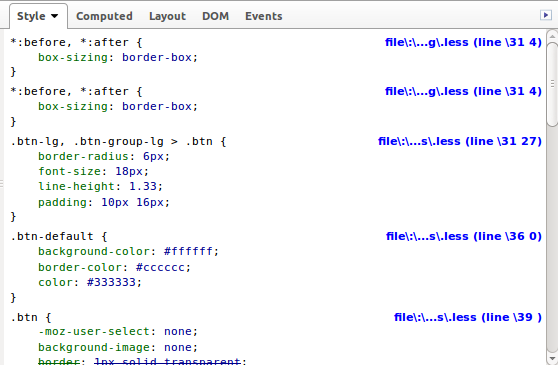
A recent patched version of Less can not be found any more. Other comments on the website says no patched version has been required since Less version 1.5. I have tested FireLess with the latest 2.2.0 version of Less. Without any modification i found that the add-on shows the names and line numbers, but the names are not showed well and the line numbers got a 3 prepend and obviously show the wrong numbers at all, as can be seen in the following figure:

fireless

The figure above runs the following code:

<link type=”text/css” href=”bootstrap3/bootstrap/less/bootstrap.less” rel=”stylesheet/less”>
<script>
var less = {
env: “development”,
dumpLineNumbers: “mediaquery”,
};
</script>
<script src=”//cdnjs.cloudflare.com/ajax/libs/less.js/2.2.0/less.min.js”></script>

Notice that FireLess requires the dumpLineNumbers: "mediaquery" option. The code returned by Less with that option set will look like that shown below:

@media -sass-debug-info{filename{font-family:file\:\/\/http\:\/\/testdrive\/bootstrap3\/bootstrap\/less\/normalize\.less}line{font-family:\0000333}}

As you can see, each URL seems to start with file\:\/\ (back slashes used for escape). The file\:\/\ prepended to the file path seems wrong (this issue has been fix in release 2.3.0). Also the values set for the font-family property are not surrounded by quotes.

There will be no need to writing a patched version to fix these issues since version 2 Less. Less v2 enables you to write easily a plugin. A postprocess plugin, which modify the compiled CSS code, can be used to correct the already mentioned issues.

You can use the following code:

<link type=”text/css” href=”bootstrap3/bootstrap/less/bootstrap.less” rel=”stylesheet/less”>
<script>
function FireLessProcessor(options) {};
FireLessProcessor.prototype = {
process: function (css) {
css = css.replace(/(@media -sass-debug-info\{)(.*)(\}\n)/g,function(m1,m2,m3,m4){
m3 = m3.replace(‘file\\:\\/\\/file\\:\\/\\/’,’file\\:\\/\\/’);
m3 = m3.replace(‘file\\:\\/\\/http\\:\\/\\/’,’http\\:\\/\\/’);
m3 = m3.replace(‘file\\:\\/\\/https\\:\\/\\/’,’https\\:\\/\\/’);
m3 = m3.replace(/(font-family:)([^}]+)(})/g, function(r1,r2,r3,r4){
return r2 + ‘”‘ + r3 + ‘”;’ + r4;
});

return m2 + m3 + m4;
});
return css;
}
};
var FireLess = {
install: function(less,pluginManager) {
pluginManager.addPostProcessor(new FireLessProcessor());
}
};

var less = {
env: “development”,
dumpLineNumbers: “mediaquery”,
plugins: [FireLess]
};
</script>
<script src=”//cdnjs.cloudflare.com/ajax/libs/less.js/2.2.0/less.min.js”></script>

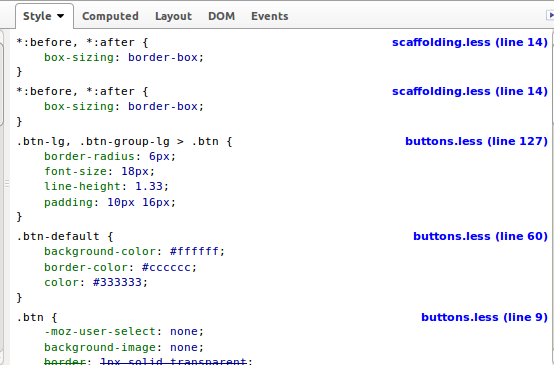
With the preceding code the FireLess add-on shows both file names and lines number as expected as can be seen in the following figure:

fireless fixed with Plugin

I have tested the plugin code above only on Linux, when you are on a Windows machine for some reason, you should possible need more or different fixes for the file paths.

Packt’s $5 eBonanza returns

Packt’s $5 eBonanza returns
My first book “Less Web Development Essentials” was published by Packt Publishing and also my coming book “Less Web Development Cookbook” will be publish be Packt Publishing. It’s a real pleasure to work with Packt Publishing. They will give all the support I need to write my books. I also love that Packt supports open source projects with their Open Source Project Royalty Scheme.

Beside my own books, Packt Publishing publish many other interesting titles. Such as “Learning Zurb Foundation” by Kevin Horek which I have reviewed myself last year.

With only some days to go till 2015 it’s definitely time for you to start learn something new. Maybe you want to learn Less, responsive webdesign, WordPress, Bootstrap or Foundation, but whatever you choose, i will be sure that Packt Publishing have the right e-book for you. Packt publishing will help you further with the eBook Bonanza. Treat yourself to the eBook or Video of your choice for just $5 (€ 4.80) and get as many as you like until January 6th 2015.

Go to the eBook Bonanza and order your e-book now!

How to change Bootstrap’s carousel animation

The popular carousel plugin of Bootstrap has been used on many websites. The jQuery plugin itself uses CSS class from the Less code of Bootstrap. So you can not change the classes names use for the carousel structure (without changing the plugin too).

In most situations you will not change the original source code of Bootstrap, to make easy updating possible.

In stead of changing the class name you can add an additional class to bind new animations to the carousel.

An example can be found at: http://www.bootply.com/Tbey4dxan1

For the example above i have add a anim class to the div with the role="listbox" as follows:

<div class=”carousel-inner anim” role=”listbox”>

After that i can use the carousel-inner anim in the Less code for my alternative animations. The carousel-inner anim selector automatically got a higher specificity than the original carousel-inner selector.

For the demonstration i have use two animations from Animate.css. The Less code for the flip animation will look like that shown below:

@keyframes flip {
0% {
transform: perspective(400px) rotate3d(0, 1, 0, -360deg);
animation-timing-function: ease-out;
}

40% {
transform: perspective(400px) translate3d(0, 0, 150px) rotate3d(0, 1, 0, -190deg);
animation-timing-function: ease-out;
}

50% {
transform: perspective(400px) translate3d(0, 0, 150px) rotate3d(0, 1, 0, -170deg);
animation-timing-function: ease-in;
}

80% {
transform: perspective(400px) scale3d(.95, .95, .95);
animation-timing-function: ease-in;
}

100% {
transform: perspective(400px);
animation-timing-function: ease-in;
}
}

.flip {
backface-visibility: visible;
animation-name: flip;
animation-duration: 0.6s;
}

I have add the animation-duration property into the .flip selector, which can be used as mixin now. Notice that CSS animation require some vendor prefixes for cross browser compatibility. I do not use vendor prefixes in my Less code but run an autoprefixer afterwards leveraging the Less Autoprefix plugin. After creating the Less code for the animation, i will create the Less code carousel-inner anim selector, which will look as follows:

.carousel-inner.anim {

> .active {
left: 0;
}

> .next,
> .prev {
position: absolute;
top: 0;
width: 100%;
}

> .next.left {
.flip();
left: 0;
}
> .prev.right {
.rotateInDownLeft();
left: 0;
}
> .active.left {
left: -100%;
}
> .active.right {
left: 100%;
}
}

I also found some related questions on Stack Overflow;
http://stackoverflow.com/questions/26770055/bootstrap-carousel-fade-no-longer-working-with-maxcdn-3-3-bootstrap-min-css and http://stackoverflow.com/questions/27626096/bootstrap-carousel-fade-not-working-on-images-need-help-understanding-why.

I have tested the above solutions on both Chrome and Firefox. In some situations (or for some browsers) you should possible also reset the original transitions. You could try to do this reset by using the following Less code:

.carousel-inner {

> .item {
transition: none;

// WebKit CSS3 transforms for supported devices
@media all and (transform-3d), (-webkit-transform-3d) {
transition: none;
backface-visibility: hidden;
perspective: 1000;

&.next,
&.active.right {
transform: none;
left: 0;
}
&.prev,
&.active.left {
transform: none;
left: 0;
}
&.next.left,
&.prev.right,
&.active {
transform: none;
left: 0;
}
}

}
}


Howto smoothly fade in your slides

For fade-out and fade-in effect, your slides should be stacked (using position absolute). An demo can be found here. For a more detailed explanation you should read my answer at stackoverflow: Bootstrap carousel refuses to transition smoothly after css adjustments. This example will also show you that the Bootstrap 3d-translations can indeed easily be reset by using the following Less code:

.carousel-inner > .item {
transform: translate3d(0,0,0) !important;
}


Compile Bootstrap with Less v2 and the autoprefix plugin

Since Bootstrap v3.2 the grunt autoprefixer plugin is part of Bootstrap’s build process. This autoprefixer postprocessor makes the prefix mixins (found in less/mixins/vendor-prefixes.less) deprecated.

Less 2 introduced plugins for the Less compiler, see also http://lesscss.org/usage/#plugins. These plugins enables you to add your own postprocessors. Postprocessors change the compiled CSS code. An example can be found at: http://stackoverflow.com/a/26539622/1596547

Less provides its own autoprefixer plugin now. Leveraging the Less autoprefixer plugin enables you to compile the Bootstrap CSS without running Grunt.

  1. Download and unzip Bootstrap’s source files. These files can be found at: https://github.com/twbs/bootstrap/archive/v3.2.0.zip
  2. When you have not done yet. Update Less to version 2: npm -g update less
  3. Than install the autoprefix plugin by running npm -g install https://github.com/less/less-plugin-autoprefix/archive/master.tar.gz (soon you should be able to run npm -g install less-plugin-autoprefix too)(for now run npm install https://github.com/less/less-plugin-autoprefix/archive/master.tar.gz, which install the latest version and supports options)

Now you can compile Bootstrap’s CSS by running in your console:
lessc --autoprefix='Android 2.3,Android >= 4,Chrome >= 20,Firefox >= 24,Explorer >= 8",iOS >= 6,Opera >= 12,Safari >= 6' less/bootstrap.less bootstrap.css

The autoprefix plugin takes care for your v3 source maps too, when running the compiler with the --source-map or --inline-source-map option. Use the compiler’s -x open to compress your compiled CSS code. Since Less v2 the clean-css option has also been moved into in plugin. You can install the clean-css plugin by running npm install less-plugin-clean-css.