Custom button colors in Twitter’s Bootstrap 3

Twitter’s Bootstrap 3 also delivers 6 button colors. Define your own button colors will a lot simpler as in Twitter’s Bootstrap 2. Cause TB3 drops support for IE7 the button css becomes more straight forward. Every button color still got 3 variants (default, active and disable). For the active state an background and border color are calculated based on the base color. The disable state use the base color and only adds a css-opacity.

TB3 not only drops IE7 support. Twitter’s Bootstrap 3 buttons don’t have a gradient. Also the text-shadow is removed.

I create a new Twitter Bootstrap Button Generator. Use this generator for Twitter’s Boostrap 3.x. Input a html color gives you the css code for your buttons. Add the css in your html after the Bootstrap’s CSS inclusion.

You got 2 choses of buttons. The default simple css and the more complex ‘old style’ css with added gradient. This new generator use Lessphp to generate the css code. Lessphp is a compiler for LESS written in PHP. See also: Twitter bootstrap buttons
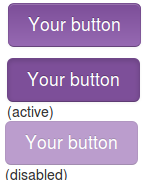
Twitter bootstrap buttons

example buttons
Twitter Bootstrap is a front-end toolkit for rapidly developing web applications and websites. It is a collection of CSS and HTML conventions. Bootstrap works with LESS. If you want to use Twitter Bootstrap for your application or website LESS makes it’s possible to tailor made it to fit to your needs. When your are not familiar with LESS you could use tools like Boottheme.com.
Beside all this most people will use Twitter Bootstrap’s default configuration. To do this you can download Twitter Bootstrap from their site or include in from a CDN like BootstrapCDN. On the example page you will find many examples how to use it. You will wrote your own html and CSS(3) to implement your designs. When using buttons Bootstrap offers only 7 colors by default. Write your own css for buttons in the colors you need can be complex. Twitter Bootstrap Button Generator (Plugo labs) and link2 are nice tools to create Twitter Bootstrap Button in different colors. Both tools don’t have the opportunity to input a exact color. So i wrote a new tool which gives you three variations of buttons (dark, light and spin) based on a hexadecimal html color code. Try Twitter Bootstrap Button Generator and generate buttons for Twitter Bootstrap on the fly.

Twitter Bootstrap 3.0 is coming soon

I tested the css code of the Twitter Bootstrap Button Generator on Bootply, see: http://bootply.com/61812. This shows the buttons in the right colors. Hovers don’t work. I will release a version of the generator for Twitter Bootstrap 3 soon.To generate buttons for Twitter’s Bootstrap 3, use this generator.