The upgrade from Twitter’s Bootstrap 2 to Bootstrap 3 was not painless. The current 3.2.0. release will give you some insights for the coming v4 release of Bootstrap. The 3.2.0. already adds some new things such as the responsive utility classes now have variants for diferents CSS display property values. The most important change till now, seems to be the adding of vendor prefixes to the CSS code automatically.
Responsive utility classes
In stead of the .visible-* classes (deprecated as of v3.2.0) you are now enable to use or .visible-*-block, .visible-*-inline or .visible-*-inline-block. The hidden-* classes don’t change because of they set the display to none always. The .visible-*-inline classes can be used to hide and display inline elements such as the <span> element. Consider the following example code to see the difference:
<p>This is a paragraph. <span class="visible-xs">(Small grid)</span>.</p>
<p>This is a paragraph. <span class="visible-xs-inline">(Small grid)</span>.</p>
As you can see in the image shown beneath, the layout of the paragraph has been broken in the first situation:
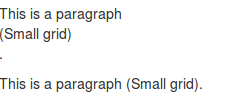
The .visible-xs class changed the display of the span element to block. Block level elements start on a new line and take all available space.
Better responsive display for embedded media
Bootstrap adds new classes for embedding media with <iframe>, <embed> and <object> elements. These classes keep the aspect ratio of your media intact when scaling down for different screen widths. With Bootstrap 3.2 you can use the following code:
<!-- 16:9 aspect ratio -->
<div class="embed-responsive embed-responsive-16by9">
<iframe class="embed-responsive-item" src="…"></iframe>
</div>
Try it a find your videos will look great again. Use the .embed-responsive-4by3 class for the 4:3 ratio.
Using autoprefixer as part of build system
The autoprefixer adds vendor prefixes to your CSS code automatically. Using the autoprefixer allows you to only use W3C property declarations in the Less code. More clean and consistent Less code will be the big win here. Note that as also described in my Less Web Development Essentials book:
Vendor-specific rules also provide us with early implementations of standard properties, and alternative syntax.
If you take a look into the <code>/less</code> directory you will find that the mixins are modularized into separate files inside the <code>/less/mixins</code> directory. Before v3.2.0 vendor prefixes where set by mixins. These mixins for vendor prefixes are moved to the less/mixins/vendor-prefixes.less for backward compatibility reasons now. These vendor prefixes are deprecated as of v3.2.0 and will be dropped in v4.
Who used Grunt to build the Bootstrap CSS already will full profit from these change. People who compile the Bootstrap Less code with an other Less compiler for their projects will find some troubles since version v3.2.0. Till v4 new and improved code will not any longer prefixed by Less. Impossibilities in your build process to auto prefix your code automatically will cause non-prefixed CSS in your code base.
To get insight in the consequences of these change you can compare the CSS code build with the Bootstrap build process and the CSS code when compiling with Less directly. Run the following commands in your Bootstrap directory:
>> grunt dist
>> lessc less/bootstrap.less nonprefixed.css
>> diff -b nonprefixed.css dist/css/bootstrap.css
After running the preceding command you will find for instance the following code:
1345c1359,1360
< box-shadow: inset 0 -1px 0 rgba(0, 0, 0, 0.25);
---
> -webkit-box-shadow: inset 0 -1px 0 rgba(0, 0, 0, .25);
> box-shadow: inset 0 -1px 0 rgba(0, 0, 0, .25);
When inspecting the compiled CSS will show you that the box-shadow property for the kbd selector is not prefixed if not using the autoprefixer. The preceding will be due to the Less code for the kbd selector in the less/code.less file does not call the .box-shadow() mixin. Before v3.2.0 not calling the prefixed mixins could be considered as an bug, since v3.2.0 these issues are solved by the autoprefixer automatically. Cause the non mixin calling code will be the prefered code for version 3.2+ and the coming version 4 of Bootstrap this code should not changed any more. Consequently the browser support of the CSS code which has been compiled by Less directly and did not run through the autoprefixer will decrease compared to Bootstrap original CSS code.
The best solution for this issue is to change your build process to enable the autoprefixer as recommended by Bootstrap. Unfortunately some situations can’t be solved this way. Grunt and so the autoprefixer requires Node.js which is not available in some situations. You can read more about this issue in my next post about the JBST WordPress starters theme, which has a built-in Less compiler based on PHP.

